zapMYstock Basic

zapMyStock™ Basic is a FREE lightweight, cross‑platform stocktake app for fast on‑site inventory counting.

Designed for users who need a simple, reliable way to capture barcode counts tied to locations — even without network access.


This product is not yet available for purchase online. If you'd like us to send you pricing or more information on this product, please click on the "Add to Quote" button below.

Please scroll down to see more details about this product!

Description

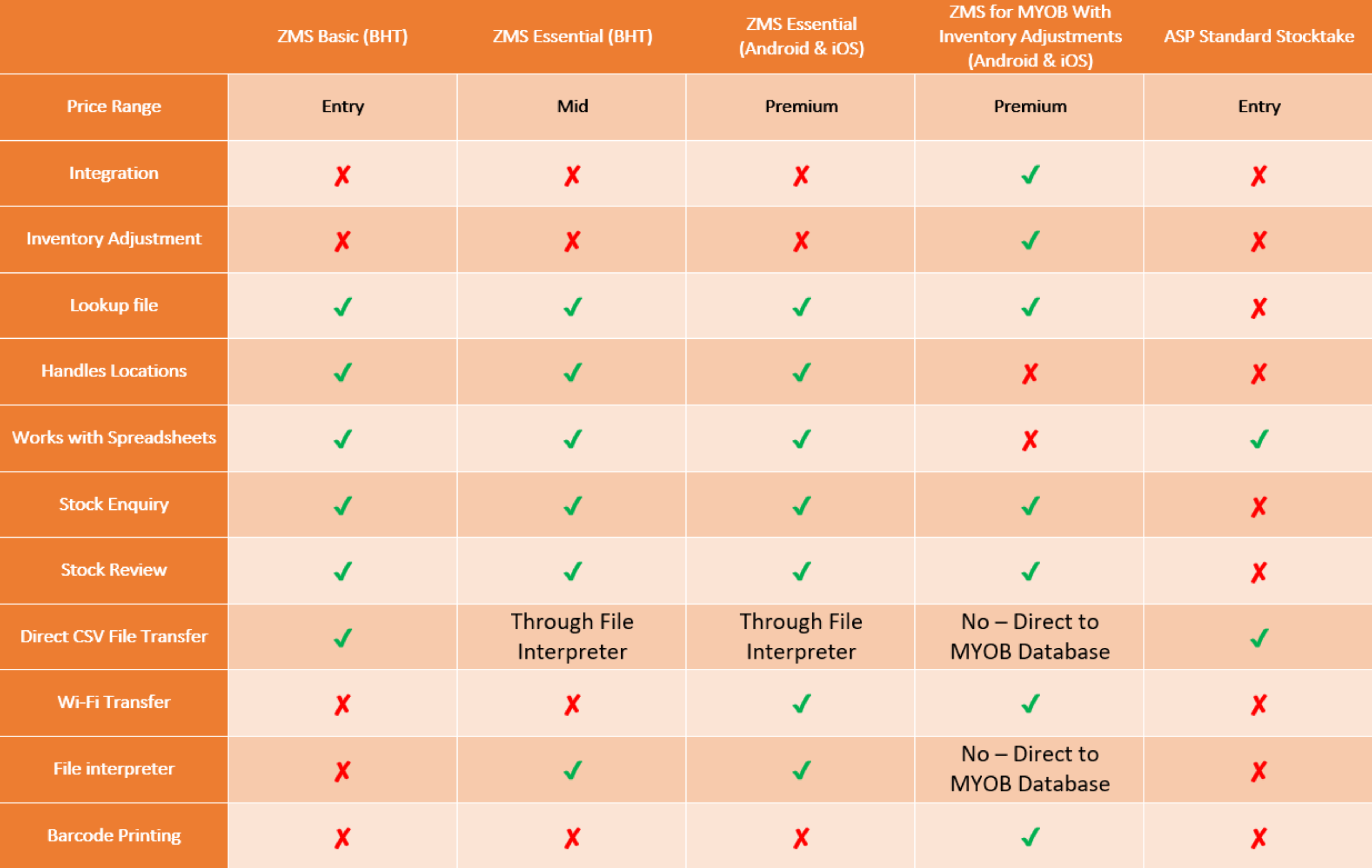
zapMYstock Basic is part of ASP’s zapMYstock family of simple stocktaking programs for barcode terminals.  Other versions of zapMYstock with different capabilities are also available [contact ASP for pricing of these other versions] – please see our web site.

  • Why choose zapMYstock Basic
  • No account required — all data remains local by default.
  • Minimal learning curve: designed for fast, repeatable counting workflows.
  • CSV output for easy import into spreadsheets or backend systems.
  • Built for speed and reliability during busy stocktakes.
  • Key features
  • Fast barcode scanning using the integrated scanner [device dependant], device camera or manual barcode entry.
  • Quick quantity entry and overwrite for repeat counts.
  • Optional location per count so you can separate stock by site/area.
  • Offline local storage so counting continues without connectivity.
  • View and review scanned records with search and page loading for performance.
  • Export counts to CSV and share using native share options (email, cloud, messaging).
  • Clear all data with confirmation (option moved to menu to avoid accidental deletes).
  • Small, focused UI with Start Count, Review Data and Share workflows.
  • Lightweight and suitable for small businesses, retail, warehouse spot checks.
  • How it works
  • 1. Tap Start Counting, optionally enter a location.
  • 2. Scan barcodes with the integrated scanner [device dependant],  camera or type them manually.
  • 3. Enter quantity and press Done/Enter — the record is saved locally.
  • 4. Review records in Review Data, export to CSV and share to your preferred service.